How Storrito Credits And Pricing Work
Storrito uses a usage-based pricing model. You only pay for the services you actually use, giving you full control over your costs. All prices are in US dollars (USD), excluding taxes.
How it works
- Add credits to your wallet: Choose an amount starting from $5 and proceed to the checkout. This amount becomes your prepaid balance, and your payment method is saved for later top-ups. 1 credit = 1 USD.
- Use services, spend credits: A small fee is deducted from your wallet each time you use a paid service.
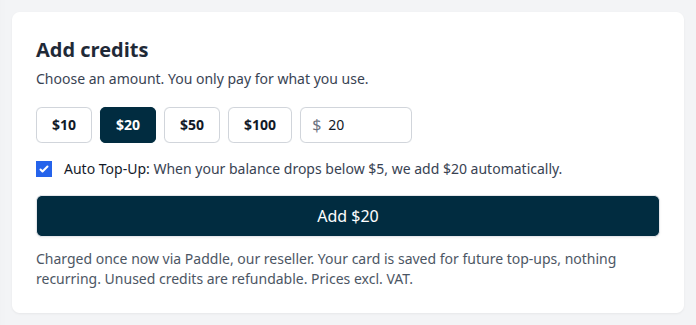
- Auto top-up (optional): When your balance drops below $5, we automatically top up your credits by the chosen amount. Tops happen at most once per day. You can turn this on or off at any time on the Subscription page.
- Cancel anytime: There are no recurring fees unless you set up auto top-up. If you stop using Storrito, any unused credits can be refunded.
Storage flat-fee
The storage fee is required for all users. It covers the storage of all your uploaded content and enables you to use the editor, gallery, stickers, and all other asset-related features.
What you pay for
| Service | Description | Rate |
|---|---|---|
| Storage flat-fee | Required for using media, the editor, gallery, stickers, etc. | $0.10/day or $3.10/31 days |
| Instagram connection | Unlimited Stories and Reels for one Instagram account | $0.50/day or $15.50/31 days |
| TikTok post | Publish a video or image on TikTok | $0.08 per post |
| YouTube Short | Publish a video as a YouTube Short | $0.08 per post |
| Facebook post | Publish a video as a Reel or a Story on a Facebook page | $0.08 per post |
| AI features in the editor | Image, video, music, speech and captions generated in the editor's AI and Captions panels | Priced per use, shown in the editor before you start |
Current rates are always shown in the Subscription view inside Storrito.
How AI features are priced
The AI features in the editor, such as AI images, videos, music, voiceovers and captions, run on AI models from different providers, and each model has its own price. Storrito shows you the estimated price in the editor before you start a generation or a transcription. The exact amount is deducted from your wallet afterwards, and it appears in your usage statement as AI Image, AI Video, AI Music, AI Speech or AI Captions together with the model used.
Your free start credits can be spent on AI features like any other service.
How to add credits
The Add credits field on the Subscription page suggests an amount that covers roughly one month of your usage based on your current setup (connected accounts plus storage, with a little headroom for extra features). You can pick one of the preset amounts or choose a custom amount and add more at any time.
Why have my credits run out?
Posting stops when your balance reaches $0. The easiest way to avoid this is by turning on auto top-up. When auto top-up is switched on, we can top up your credits automatically as soon as your balance drops below $5. You simply select an amount and we handle the rest. If you'd prefer not to use auto top-up, just keep an eye on your balance and make sure that you add credits before they run out.
Where can I find my usage statements for credits?
You can find your usage statements on the Subscription page. These show you exactly which services your credits have been spent on, day by day.
Still on a monthly or yearly top-up?
Customers who subscribed before September 2026 may still have a recurring top-up that adds a fixed amount of credits ever month or year. This will keep renewing as before, but you can switch to pay-as-you-go at any time. Any remaining credits left over from your monthly and yearly top-ups stay in your wallet.
Why usage-based pricing
- Flexibility: Scale up for big campaigns and scale back during quieter periods. Your costs adjust automatically.
- Fairness: You never pay for features or connections you don't use. Someone managing one Instagram account won't subsidise someone managing fifty.
- Transparency: View a detailed usage breakdown at any time in the Subscription view.
Track your spending
You can monitor your credits and usage directly in Storrito:
- Open the Subscription view to see your current balance
- Download usage statements for a detailed breakdown
- Access and download invoices for your records
Common questions
For the questions we get asked most often about credits, including negative balances, subscription warnings, and what happens when you disconnect an account, see Credit Pricing: Frequently Asked Questions.
Cancellation and credit refunds
You can cancel your Storrito subscription at any time. If you cancel, we'll refund any unused credits. Contact us via support chat right away so we can process the refund manually.
Tools
- Subtitle overlay
- Auto Post Instagram Stories
- How to Upload a Video to Instagram Story from PC
- Schedule Instagram Stories with the Link Sticker
- Instagram bio generator
- Upload and post Instagram Reels from PC
- Subtitle generator
- Instagram grid maker
- Schedule Instagram Stories
- Turn an MP3 into an Instagram Story video
- Can you schedule Instagram stories? Yes, with Storrito.com! (Here's How)
- Instagram Story bingo generator
- Storrito toolbox
- Instagram Story Planner (Scheduler)
- Instagram font generator
- Instagram Story 'this or that' generator
- Schedule Facebook Stories from PC
- Instagram Story Maker Online
- Trim a video
- Instagram carousel maker
- PDF to Instagram carousel
- How to schedule Instagram Reels
- How to add a story in Instagram from PC or Mac?
- Post Instagram Stories from PC
- Instagram Story tier list generator