What's new in Storrito
New features, improvements and fixes, newest first. The date is the day a change went live for everyone.
September 28, 2026
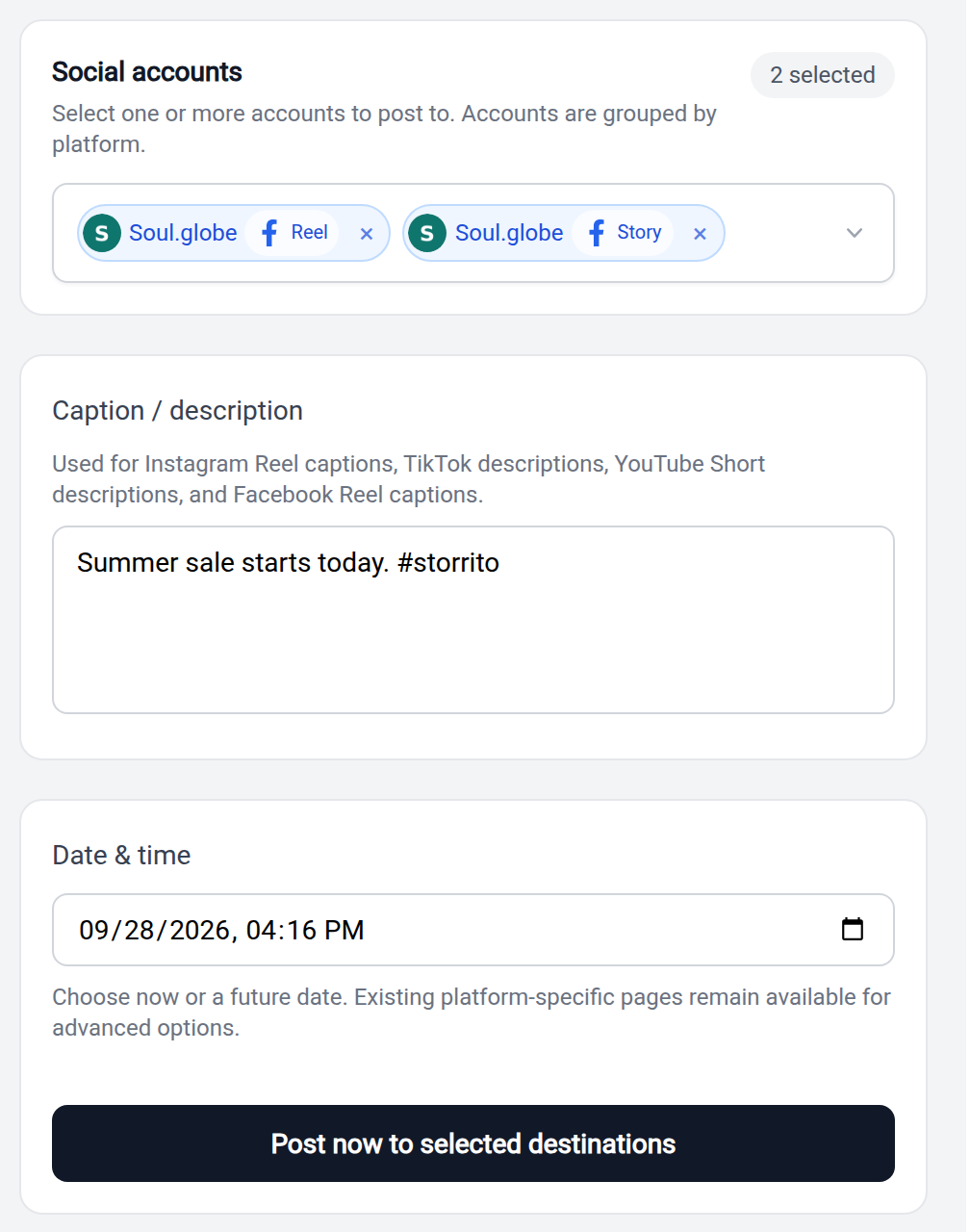
Reels and Stories for your Facebook Page
Connect a Facebook Page under Facebook Pages in the sidebar and schedule Reels and Stories on it. You use the same scheduling page and the same video as for Instagram, TikTok and YouTube. Tick the Page under Facebook Reels, under Facebook Stories, or under both. Both need a video. A Reel can be up to 20 minutes long, a Story up to 60 seconds. The posts appear in your schedule with a Reel or Story badge, and you can cancel them until they go out. A published Reel or Story costs $0.08. Sharing an Instagram Story to Facebook works as before. How to schedule Facebook Reels and Stories shows every step.
Storrito CLI for the terminal and for coding agents
storrito is a command-line tool for macOS, Linux and Windows. Every procedure of the Storrito API is a command with JSON output, so you can list your accounts, schedule a Story, a Reel or a TikTok post, create a draft or check a status from a script.
curl -fsSL https://storrito.com/install.sh | sh
storrito login
storrito login signs you in through the browser. For servers and CI you use an API credential instead. storrito setup claude, storrito setup codex and storrito setup agents install a skill that teaches your coding agent to use Storrito. The CLI documentation has the details. In the app, the page Storrito CLI in the sidebar has the same steps with the ID of your organization filled in.
Instagram Reels from Claude, and one address for the MCP server
Claude can schedule an Instagram Reel through the MCP server, check its status and cancel it. Until now the server covered Stories, TikTok posts and drafts. Every tool has a title and says whether it reads or changes something, so Claude asks you before it publishes or deletes. The server also has one address for every organization, https://mcp.storrito.com/mcp. You sign in and pick the organization. The address of your own organization keeps working. If a tool fails for an unexpected reason, the answer carries an error ID that you can send to our support.
The editor no longer gets stuck on "Uploading media..."
The editor could stay on "Uploading media..." with a disabled Share button, mostly on image stories with a blurred background. If an upload makes no progress for 90 seconds, the editor reports it and lets you save and share again.
Smaller changes
schedule-instagram-storyanswers with HTTP 429 when a mention cannot be looked up at the moment, so your client knows it can retry. Before, it answered with a 400 that read as permanent.- A video file that cannot be read, or a media URL whose server refuses the download, gets an HTTP 400 with a message instead of a 500.
September 24, 2026
Clearer screens when you connect an Instagram account
The connect dialog got clearer in several places. After a mistyped username it suggests the account Instagram found. The screen for the login code tells you where Instagram sends the code. When Instagram asks for a security check, the dialog says what to do in the Instagram app. On a phone the page behind a connect link scrolls, so you can reach the confirm button.
Smaller changes
- When the connection to a TikTok account has expired, the scheduling page asks you to reconnect it. Before, it kept loading the TikTok settings without end.
September 23, 2026
Captions for your videos
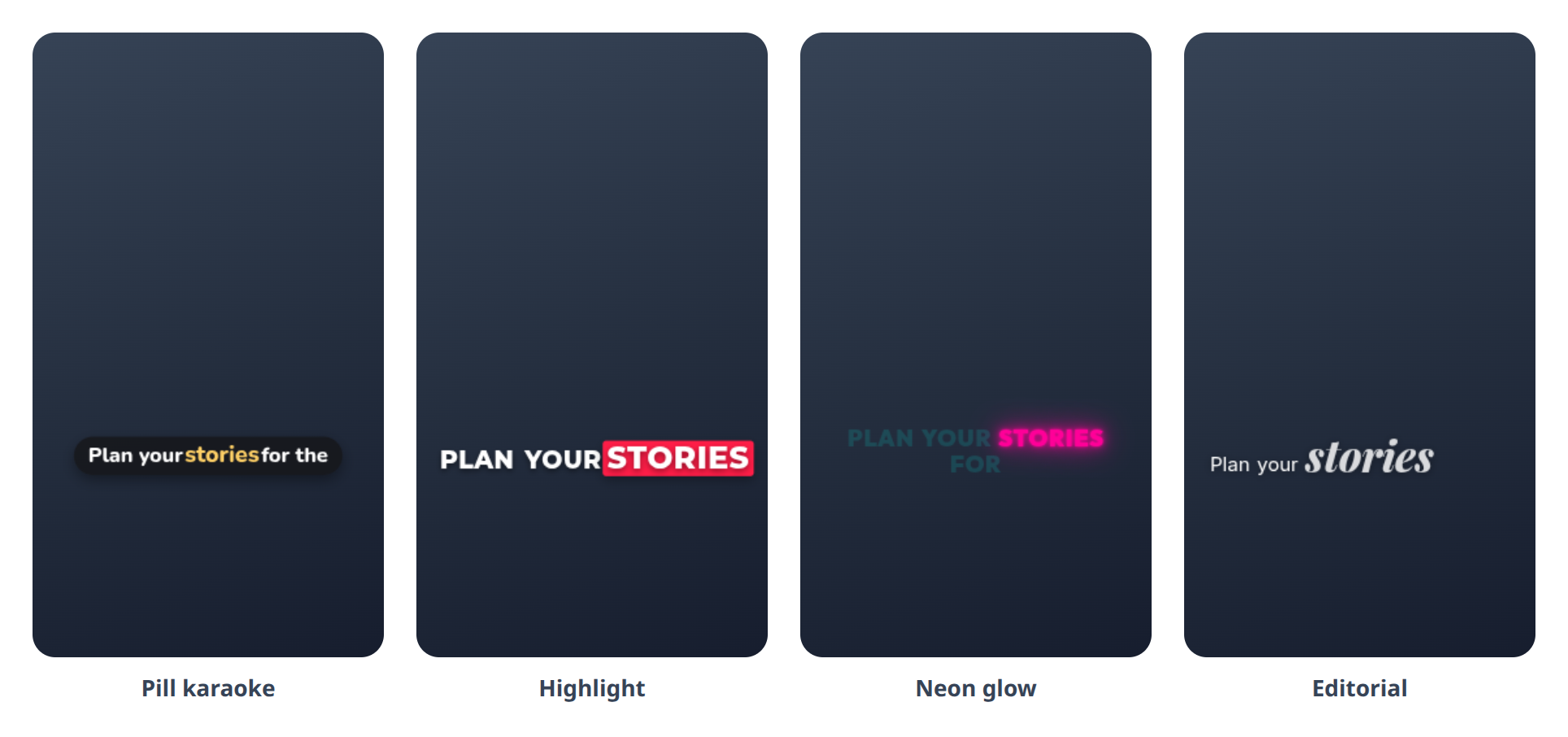
Open a video in the editor and click Captions. Storrito transcribes the speech and shows the words on the video as they are spoken. You pick one of 16 caption styles from previews with your own words. The transcript is a text you can edit. Fixing a typo keeps the timing, Enter starts a new caption line, and a click on a word jumps to it in the video. The captions belong to the clip, so they move along when you trim or cut it. The panel shows the price before you start. Clips can be up to 5 minutes long. How to add captions to your videos shows every step.
Smaller changes
- Videos with extra tracks, such as a second audio track from a camera or an editing tool, upload and play again.
September 22, 2026
Create drafts through the API and the MCP server
create-draft puts a story design into your gallery without scheduling it. You or a colleague review it in Storrito and schedule it by hand. status-draft tells you whether the draft is rendered and returns a preview, delete-draft removes it. You can create 100 drafts in 24 hours. The three procedures are also tools of the MCP server.
Edit a scheduled Reel
Click a scheduled Reel in your schedule and it opens with its caption, options and date. Until the Reel starts posting you can change them and save with "Update scheduled Reel". Before, the page opened with an empty caption field.
The editor keeps what you add while a fresh upload loads
Opening a fresh upload in the editor shows "Loading..." until the media is there. Before, the editor showed an empty canvas first, and a sticker you added in those seconds disappeared when the media arrived. Videos also open faster.
Videos in the Story format are not converted again
Storrito no longer converts a video that is already a vertical 9:16 video in the H.264 format. The video keeps its original picture and is ready sooner. Storrito converts all other videos as before.
Smaller changes
- The question of the emoji slider sticker wraps at spaces instead of in the middle of a word.
- Very long words no longer stick out of poll, quiz and question stickers.
- The Storrito emojis in the emoji picker can be added. A click on them did nothing before.
- Items and folders you move in the gallery by drag and drop change place at once.
September 21, 2026
Two-factor codes are hidden until you ask
The Instagram accounts page shows dots instead of the current two-factor code. An eye button reveals the code, and the copy button works while the code is hidden. That helps when you share your screen.
September 18, 2026
A new gallery
We rebuilt the gallery. It appears right away, also for large galleries, where the old one sometimes opened as an empty gray page. Folders, drag and drop, selection and the archive work as before. The folder list is always visible, also before you created your first folder. Old bookmarks still work.
Sharper story videos
The editor encodes story videos at a higher quality. You see it most in videos with a lot of motion or fine detail. It applies to videos rendered from now on. Save an older design again to get the new quality.
Canva imports keep working
Storrito copies a design from Canva at the moment you import it. Before, a design could keep pointing to a download link at Canva that expires, and the story could not be rendered later. If you have such a design, import it again.
Smaller changes
- Closing the music sticker dialog while a song preview plays stops the music.
September 16, 2026
Smaller changes
- Fewer unnecessary disconnects of Instagram accounts.
- The Facebook page linked to an Instagram account is available right after you connect the account. You no longer have to click Sync first.
September 15, 2026
AI images, videos, voices and music in the editor
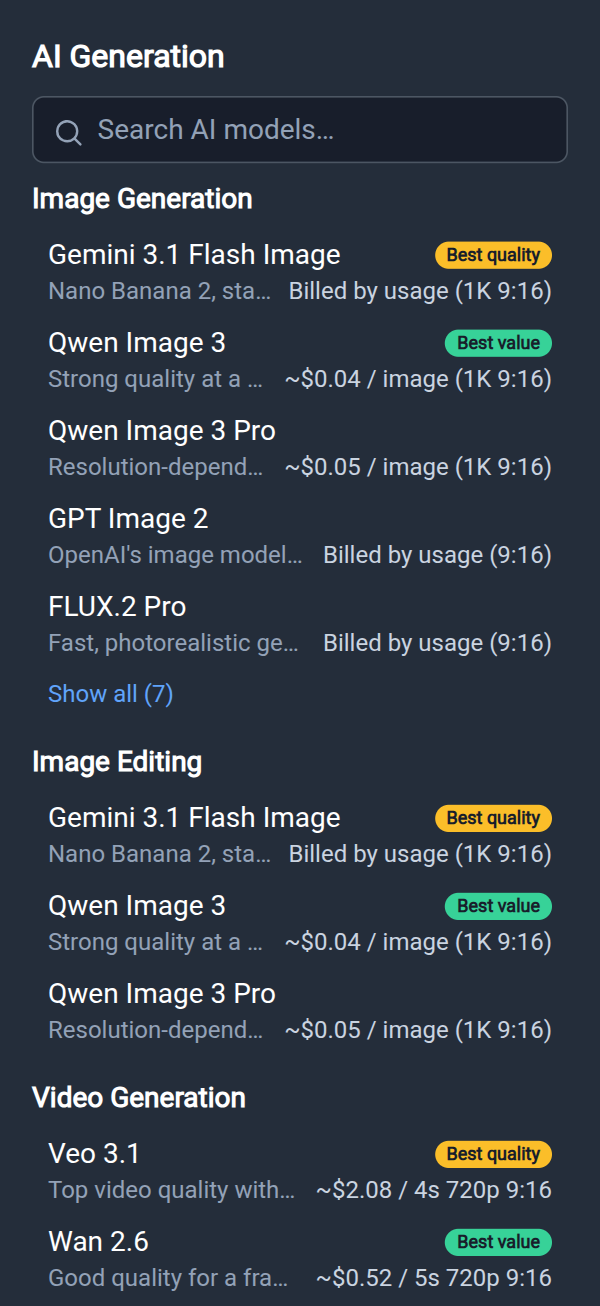
The AI button in the editor opens a panel with AI models for image generation, image editing, video, music and text to speech. Among them are Nano Banana 2, Qwen Image, Veo 3.1 and Wan 2.6. You pick a model, write a prompt and set options such as resolution and duration. The panel shows an estimated price before you start, and the result lands in your story as its own clip. A double click on the clip opens the prompt again. Each generation is paid from your credit balance.
Add credits from $5
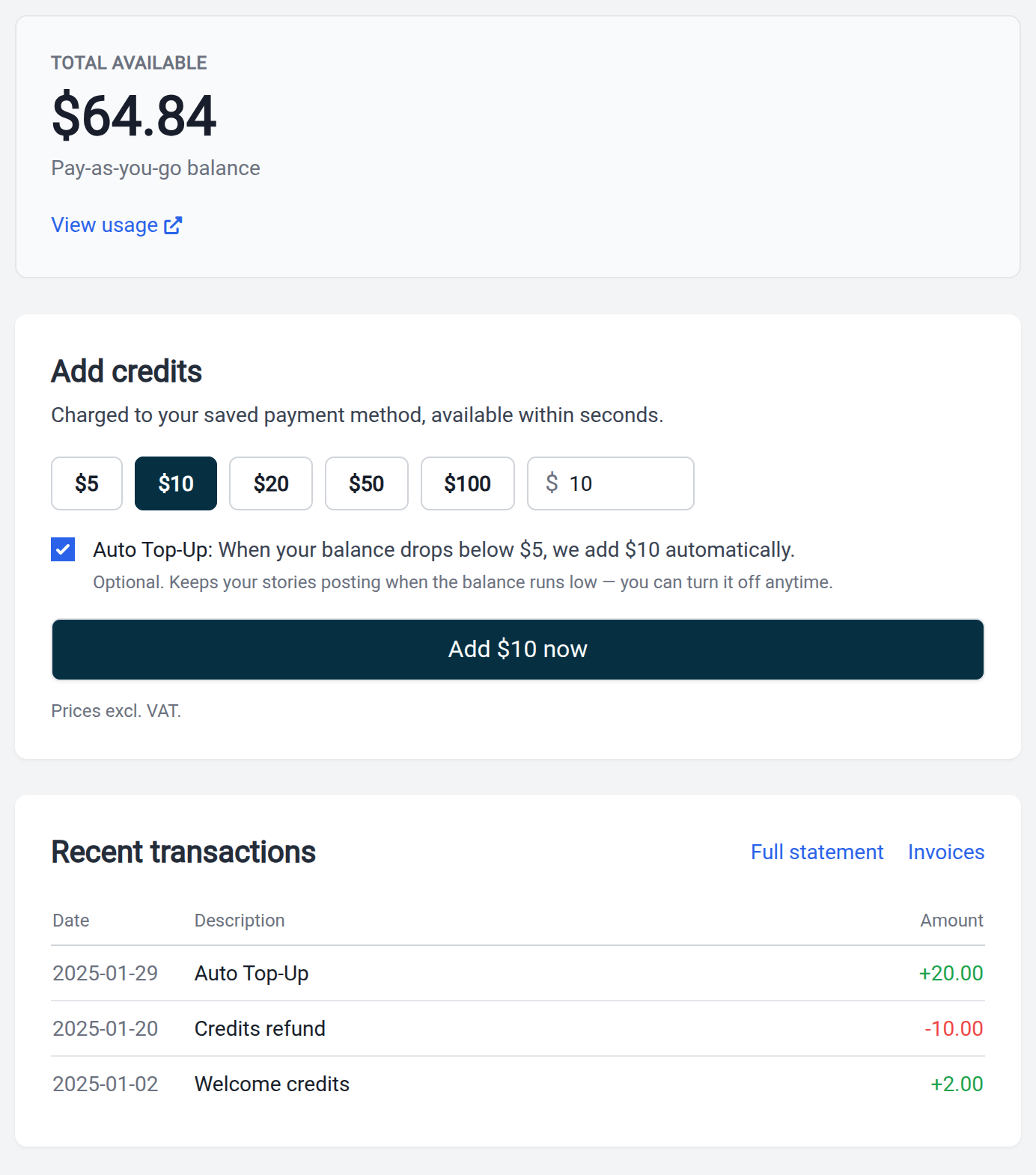
The amounts on the credits page start at $5, and $10 is preselected. Auto Top-Up is optional and stays off until you switch it on.
Smaller changes
- After signing in you land on the page you opened, for example from a link in an email. Before, every login ended on the schedule.
September 14, 2026
Canva stays connected
A few hours after you connected Canva, creating a design from Storrito could fail and cut the connection. Storrito renews the connection in the background, so you don't have to authorize Canva again.
September 10, 2026
Sync button for the Facebook page and highlights of a new account
Right after you connected an Instagram account, the story options on the scheduling page showed neither the Facebook page nor your highlights. There is a Sync button now. One click loads both without leaving the page.
Team invitations open the login
The button in a team invitation email opens the login for the invited address. A new member who has no password yet sets one with "Forgot password?".
Smaller changes
- When a gallery folder opens while you drag an item, you can drop the item on the grid or below the folder list.
- On very wide screens the gallery loads enough items to fill the page.
September 8, 2026
Smaller changes
- The scheduling page preselects your Instagram account if you have exactly one.
- Editing a date by hand in bulk scheduling no longer makes the row jump while you type. The row moves when you leave the field.
September 7, 2026
Schedule posts from Claude and other AI assistants
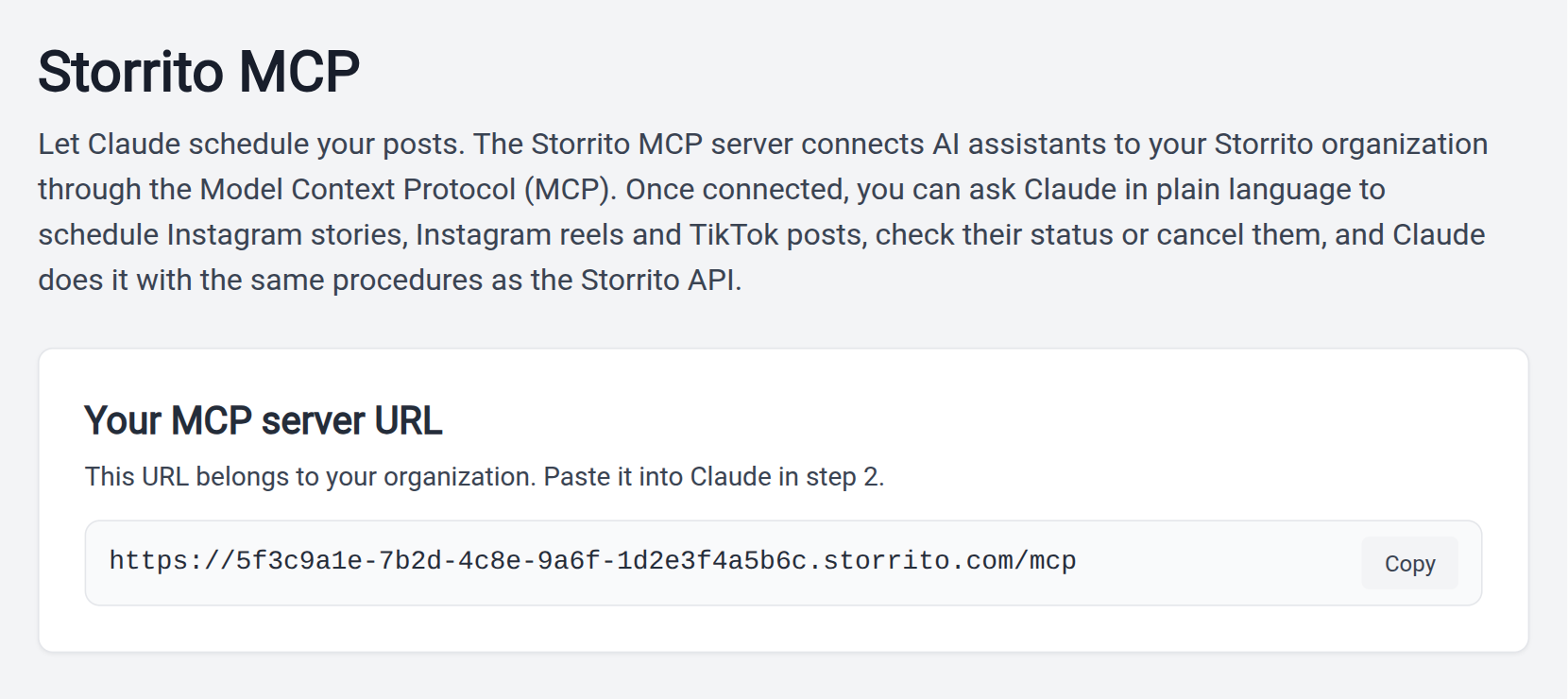
Storrito has an MCP server. Connect it in Claude and ask in plain language to schedule an Instagram Story or a TikTok post, to check its status or to cancel it. Claude needs the address of the server and your Storrito sign-in, no API key. Claude Code, Cursor and other clients connect with an API credential. The page Storrito MCP in the sidebar has the address, the setup steps and example prompts.
Preview image and warnings in the API
status-instagram-story returns a previewUrl once the story is rendered, usually within a minute. You can check the design before the story goes out. schedule-instagram-story returns a list of warnings for unknown elements and for stickers that overlap. The story is scheduled anyway.
Smaller changes
- Bulk scheduling tells you when a changed story shares its minute with another one, and blocks Save until you move it.
- Shift-click selects a range in the FB and AI columns of bulk scheduling.
- A story with a poll sticker without question text is posted again. The poll goes out with an empty question, as in the Instagram app.
September 3, 2026
Connect an Instagram account with a login code
When Instagram rejects your password in the connect dialog, pick "Log in with a code instead". Instagram sends a login code to the email address or phone number of the account, you enter it, and the account connects. The dialog also warns about a space at the start or end of a pasted password.
Upload media and create connect links through the API
API clients can upload an image, video or audio file and use the returned URL in the story, instead of sending the file base64-encoded inside the request. create-temp-blob-upload-url takes files up to 100 MB, upload-temp-blob up to 30 MB. An upload is deleted after about a day, so schedule the post within 24 hours. create-connect-link returns a link that the owner of an Instagram account opens to connect it. The password never passes through your code.
Bulk scheduling groups your posting sessions
Bulk scheduling splits the schedule into groups, with a label for each new day and for each gap of more than 30 minutes. The checkbox on a label selects the whole group. Moving a whole posting session takes two clicks.
September 2, 2026
Move many stories at once in bulk scheduling
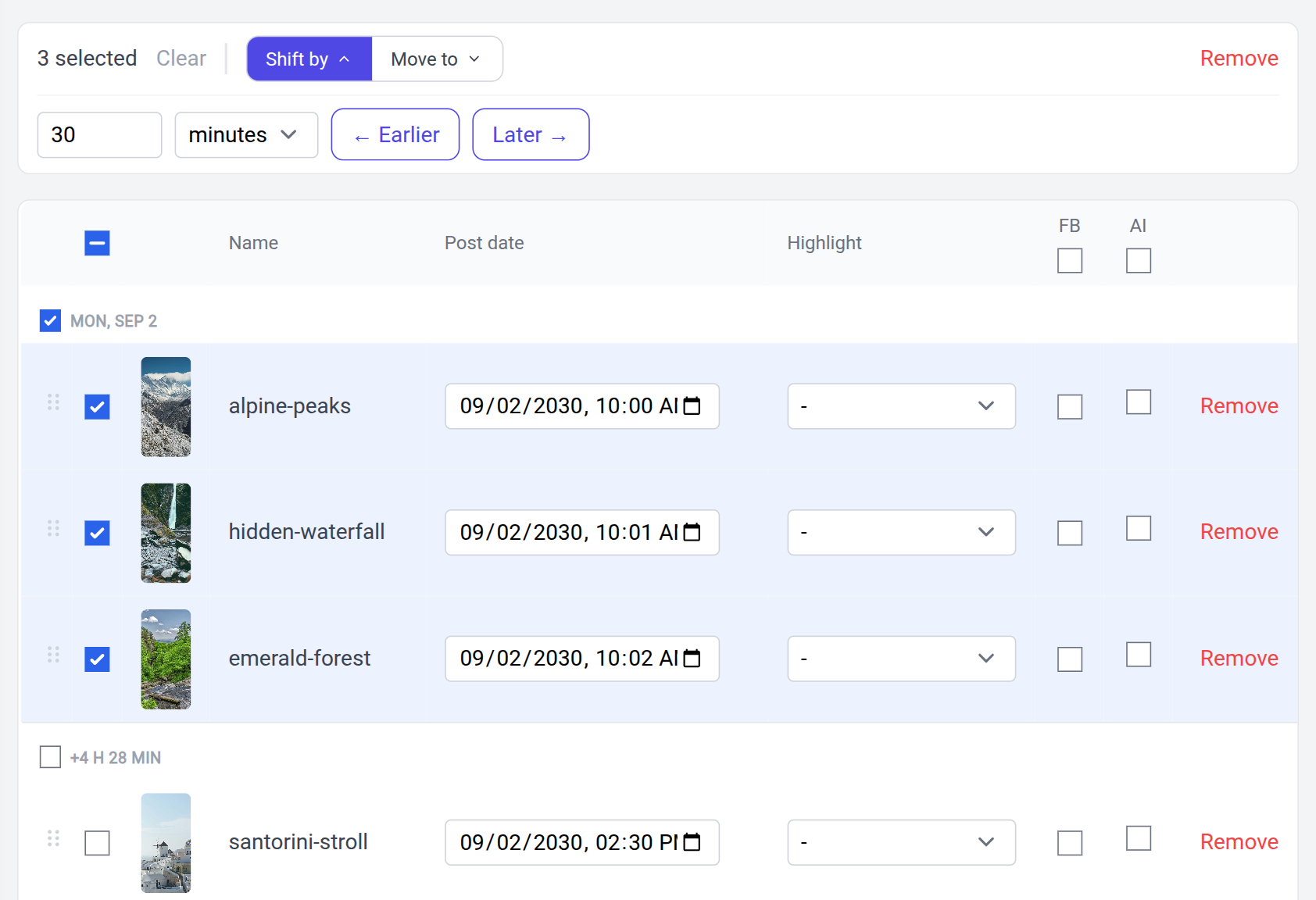
Tick the rows you want to move in bulk scheduling. "Shift by" moves them earlier or later by minutes, hours or days and keeps the gaps between them. "Move to" puts the earliest story on a date and time you choose, and the others follow with their spacing. "Remove" takes the rows out. Nothing is canceled until you click Save.
September 1, 2026
Pay as you go with credits
The Subscription page is now a credits page. It shows your balance, your recent transactions, your payment method and the rates. New customers no longer pick a monthly or yearly plan. You add credits and pay again when you add more. Auto Top-Up adds an amount you choose when the balance drops below $5, at most once a day. If you have a monthly or yearly top-up, you keep it, and you can switch to pay-as-you-go for free. Customers on one of the older plans keep their plan and their page. The page is translated into German, Spanish, French, Italian, Japanese, Dutch, Portuguese and Turkish. The credit pricing FAQ answers the common questions.
Drag and drop, previews and change markers in bulk scheduling
Rows have a handle. Drop a row on another position and the two stories change places while the time slots stay. A click on a thumbnail opens a large preview, and videos play in it. New rows are marked green and edited rows amber, and a summary next to Save tells you what Save will do. The headers of the FB and AI columns have a checkbox that switches all rows at once.
Select many gallery items at once
Shift-click selects every item between two clicks. Cmd-click or Ctrl-click adds or removes a single item, and the selection bar offers "Select all". Deleting a folder asks first and lists what is affected. The items move back to the main gallery unless you tick the option to delete them too.
Smaller changes
- If you have no account connected yet, the scheduling page shows the cards to connect Instagram, TikTok or YouTube.
August 28, 2026
Posts that could not go out say why
A Story or Reel that could not be published within an hour of its scheduled time is marked as failed and asks you to schedule it again. Before, such a post could stay on "Posting..." forever. A video that Instagram rejects, for example one shorter than half a second, fails right away with the reason. If you use webhooks, you receive the status "failed" for these posts.
Schedule Instagram Reels through the API
The API has three new procedures, schedule-instagram-reel, status-instagram-reel and cancel-instagram-reel. You describe a Reel like a story, with a video as its source, and set the caption, the date and whether the Reel appears in the feed.
TikTok posts and YouTube Shorts wait for credits
Scheduled TikTok posts and YouTube Shorts wait while your credit balance is negative. They go out once you add credits. Instagram Stories and Reels already worked this way.
"The first $2 are on us"
We dropped the word "trial". A new account starts with $2 of credit and needs no credit card. While you use the start credit, the top bar has an Upgrade button. When the credit is used up, the publish pages show the prices.
August 26, 2026
The connect dialog explains Instagram's security steps
Instagram sometimes asks for more than a password when you connect an account. The dialog shows the matching step, such as entering a phone number, setting a new password, approving the login in the Instagram app, or waiting about 15 minutes when Instagram limits login attempts. It used to say "Something unexpected happened". The dialog also respects the verification method you choose, email or SMS.
Book a call from inside the app
A phone button next to the chat opens the booking page for a call with our team. You also find the link where people tend to get stuck, for example in the connect dialog and on an empty schedule.
Smaller changes
- When TikTok rejects the authorization while you connect an account, you see a page with a "Try Again" link instead of a server error.
August 25, 2026
Music sticker for Instagram Stories
You can add Instagram's music sticker to a story. In the editor, open Sticker and click Music, then search for a song or browse the lists. Listen to the preview and pick the 5, 10 or 15 seconds you want. The sticker comes in the styles Simple, Album Art and Vinyl. There is also an invisible style, so the music plays without a sticker. Which songs you get depends on the connected Instagram account. Storrito always publishes a story with music as a video.
Move gallery folders into folders
Drag a folder onto another folder to nest it, or onto the breadcrumb to move it up. While you drag, Storrito outlines the possible targets, and a folder opens when you hover over it for a second. Folder rows have a "..." menu with Rename and Delete.
Smaller changes
- The emails Storrito sends share one design with a logo header.
- The account you picked on your schedule is preselected when you schedule a story.
August 19, 2026
Smaller changes
- "Post now" posts to exactly the accounts that are ticked when you click.
- A highlight you chose for one story is no longer carried over to the next story.
- A story with a very long upload is no longer started a second time.
August 7, 2026
Search your accounts in the account picker
The row of account buttons is now a dropdown with a search field. Accounts are grouped by platform, and you filter them by typing. Arrow keys, Enter and Escape work. Disconnected accounts show a warning icon. The picker is on your schedule, in bulk scheduling and on the scheduling page.
Smaller changes
- The Instagram connect dialog works with password managers such as LastPass. The form could freeze while you typed.
- Instagram shows its "AI info" line on Stories and Reels that you marked as AI-generated.
August 5, 2026
Bulk scheduling saves only what you changed
A save in bulk scheduling changes the rows you edited and leaves all others alone. After saving, the saved values stay on screen.
Protection against double posts
A double click on the schedule button, or two identical requests at the same moment, no longer create the same story twice.
August 3, 2026
Smaller changes
- Scheduled posts in the "Scheduling activity" list have a Cancel link. It works for Stories, Reels, TikTok posts and YouTube Shorts.
- Stickers on stories created through the API are tappable across their whole area again. If a sticker cannot be measured, the API answers with an HTTP 400 that names the sticker.
July 31, 2026
Mark Stories and Reels as AI-generated
Tick "AI-generated content" when you schedule an Instagram Story or Reel, and Instagram shows its AI label on the post. Bulk scheduling has an AI column for it. Marked posts carry an AI badge in your schedule.
Facebook cross-posting and the AI label in the API
schedule-instagram-story accepts aiGenerated, shareToFacebook and facebookDestinationId. list-instagram-users returns the Facebook pages linked to each Instagram account. The limit of 100 Story posts per Instagram account counts a rolling 24-hour window around the requested date. Before, all scheduled posts counted, which blocked accounts that plan far ahead.
July 29, 2026
First comment on Instagram Stories
Enter a first comment when you schedule an Instagram Story, for example your hashtags. Storrito posts it as a comment right after the story went live. The field is optional.
Warning when an account does not offer a sticker
Instagram does not offer every interactive sticker to every account. The scheduling page checks the poll, quiz, question, slider and countdown stickers of your design against each account you picked, and warns you when one is missing there. You can still schedule the story.
Videos from an iPhone show up in the gallery
On an iPhone a video upload could finish its progress bar and never appear in the gallery. The upload always completes now.
July 22, 2026
Your first connect link
Generating a connect link failed for teams that had never created one. It works now. A connect link lets a client connect their Instagram account without giving you the password.
July 21, 2026
YouTube Shorts
Connect your YouTube channel with your Google login and post or schedule videos as Shorts. You set the title, the description and the visibility for each Short. Videos can be up to 3 minutes long, vertical or square. Scheduled Shorts appear in your schedule, and you can cancel them before they go out.
Smaller changes
- A story scheduled with the highlight selection on "-" is no longer added to a highlight.
July 16, 2026
Clearer messages when you connect an Instagram account
The login form explains why Storrito asks for your Instagram login. When Instagram wants an extra confirmation, the form says so and offers a login by code or email link, instead of reporting a wrong password. The highlights of a new account are available right after connecting.
July 14, 2026
Sharper Canva imports
Designs imported from Canva looked blurrier than the same design downloaded from Canva. Storrito asks Canva for the best export quality now. That needs a Canva Pro license. Without one you get the standard quality.
July 13, 2026
Smaller changes
- The scheduling page and bulk scheduling refuse a date in the past.
- The Schedule button of the editor opens the scheduling page, where you send a design to Stories, Reels and TikTok in one step.
- Designs with a very large number of layers render in seconds.
- Designs with audio from an external address no longer get stuck while rendering.
July 8, 2026
Stickers stay interactive when you drag them
Dragging a poll, quiz or other sticker in the editor could create a copy of it as a plain picture, which nobody could tap on Instagram. That can't happen anymore. Adding a quiz sticker a second time replaces the first one.
July 3, 2026
Smaller changes
- The scheduling page opens faster for teams with many Instagram accounts.
- Stories older than 24 hours show as "Expired" in the activity list, with the time they were posted.
July 2, 2026
Notice when a story is already scheduled for the same minute
The scheduling page notices when the same story is already scheduled for the same Instagram account in the same minute. It points to the existing entry and disables the button. Different stories can still share a minute.
July 1, 2026
Smaller changes
- A new image, GIF or text in the editor runs from the playhead to the end of the slide.
- A TikTok post that gets stuck in processing is marked as failed and no longer holds up your later posts.
June 30, 2026
Smaller changes
- Hover the "Failed" badge of a post in your schedule to read the reason.
- Your schedule loads faster.
June 26, 2026
Recent mentions, hashtags and locations
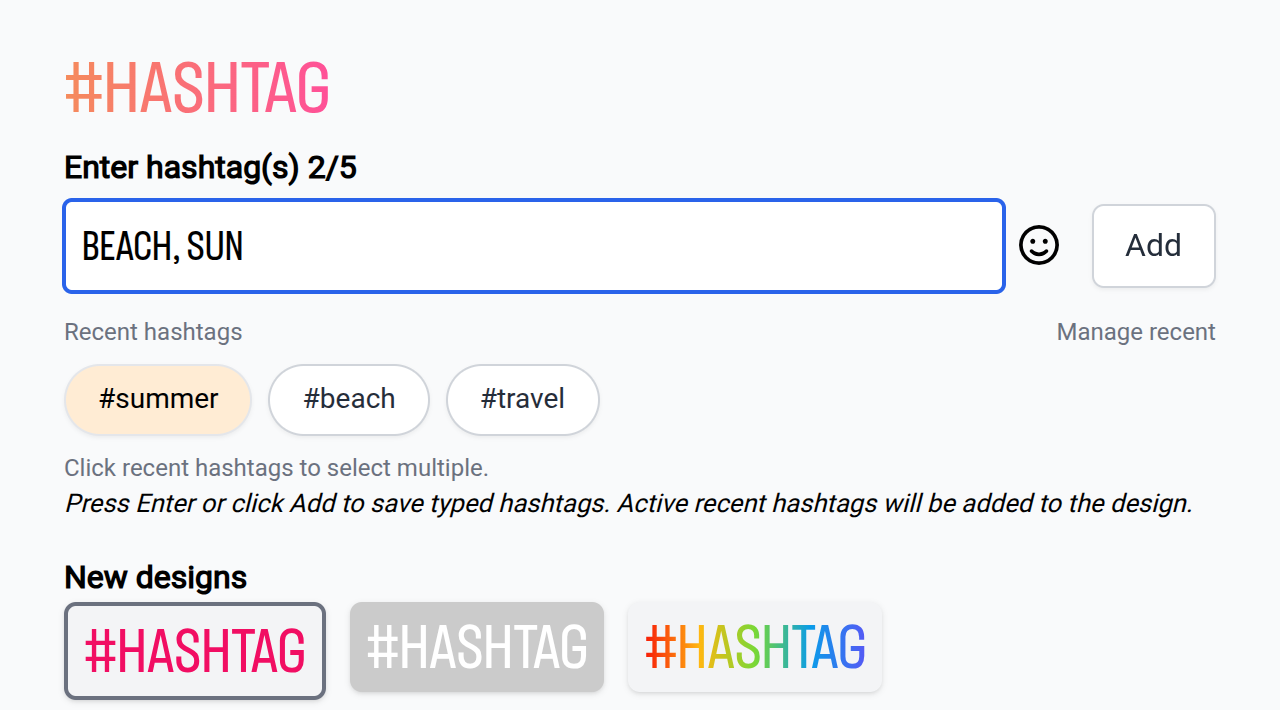
The dialogs for mention, hashtag and location stickers remember what you used before. One click adds a saved mention or location again. You can pick several recent hashtags at once, and "Manage recent" removes entries. The lists are stored in your browser, so they don't follow you to another device.
June 25, 2026
One page to schedule Stories, Reels and TikTok posts
The new scheduling page sends one image or video to several destinations in one step. Pick Instagram Stories, Instagram Reels and TikTok, on one or more accounts, and each destination shows its own options. A video from your gallery can become a Reel. Before, a Reel needed its own upload. The page remembers your selected accounts and lists where the item is already scheduled or posted.
Smaller changes
- Muted videos and videos without sound play silently on Instagram. Before, some phones played a noise.
- After you pick a GIF, the sidebar stays open and your next pick replaces it.
June 22, 2026
Reels are retried like Stories
A scheduled Reel that fails for a temporary reason is tried again, like a Story. Reels of one account go out in the order you scheduled them.
June 18, 2026
Text colors work in Safari
In Safari, choosing a text color or a text background color in the editor had no effect. Both work now.
June 17, 2026
New accounts start with $2 of credit
Every new account gets $2 of credit at signup, without a credit card. The credit works for every paid feature. Before, the trial was limited by time and by a number of story posts.
TikTok in the API
The API has four new procedures for TikTok, list-tiktok-accounts, schedule-tiktok-post, status-tiktok-post and cancel-tiktok-post. A post goes out right away or at a scheduled time. Its status turns to "executed" only after TikTok confirmed the publication.
June 12, 2026
Cancel a post that waits for its next attempt
When a post failed and Storrito waits to try again, you can cancel it from your schedule.
June 10, 2026
Schedule TikTok posts
TikTok posts, video or image, can be scheduled for a later date and time. Until now Storrito could only post to TikTok right away. Scheduled TikTok posts appear in your schedule next to the Instagram posts, and you can cancel them before they go out.
Webhooks for story status changes
Register up to 5 webhook URLs under Storrito API in the sidebar. Storrito sends a POST request when an Instagram Story post is scheduled, published, canceled or has failed. A "Send test" button sends a test delivery.
June 8, 2026
Team members get an invitation email
When you invite someone to your team, Storrito sends them an email with the name of the team, your name and a link to get in. Before, you had to tell them yourself.
Tools
- Subtitle overlay
- Auto Post Instagram Stories
- How to Upload a Video to Instagram Story from PC
- Schedule Instagram Stories with the Link Sticker
- Instagram bio generator
- Upload and post Instagram Reels from PC
- Subtitle generator
- Instagram grid maker
- Schedule Instagram Stories
- Turn an MP3 into an Instagram Story video
- Can you schedule Instagram stories? Yes, with Storrito.com! (Here's How)
- Instagram Story bingo generator
- Storrito toolbox
- Instagram Story Planner (Scheduler)
- Instagram font generator
- Instagram Story 'this or that' generator
- Schedule Facebook Stories from PC
- Instagram Story Maker Online
- Trim a video
- Instagram carousel maker
- PDF to Instagram carousel
- How to schedule Instagram Reels
- How to add a story in Instagram from PC or Mac?
- Post Instagram Stories from PC
- Instagram Story tier list generator