How To Add The Quiz Sticker
The Quiz sticker is a fantastic way to engage with your audience. Here's how to add it using Storrito.
Steps to Add a Quiz Sticker in Storrito
Step 1: In the editor, click “Sticker” in the left sidebar to open the sticker panel.
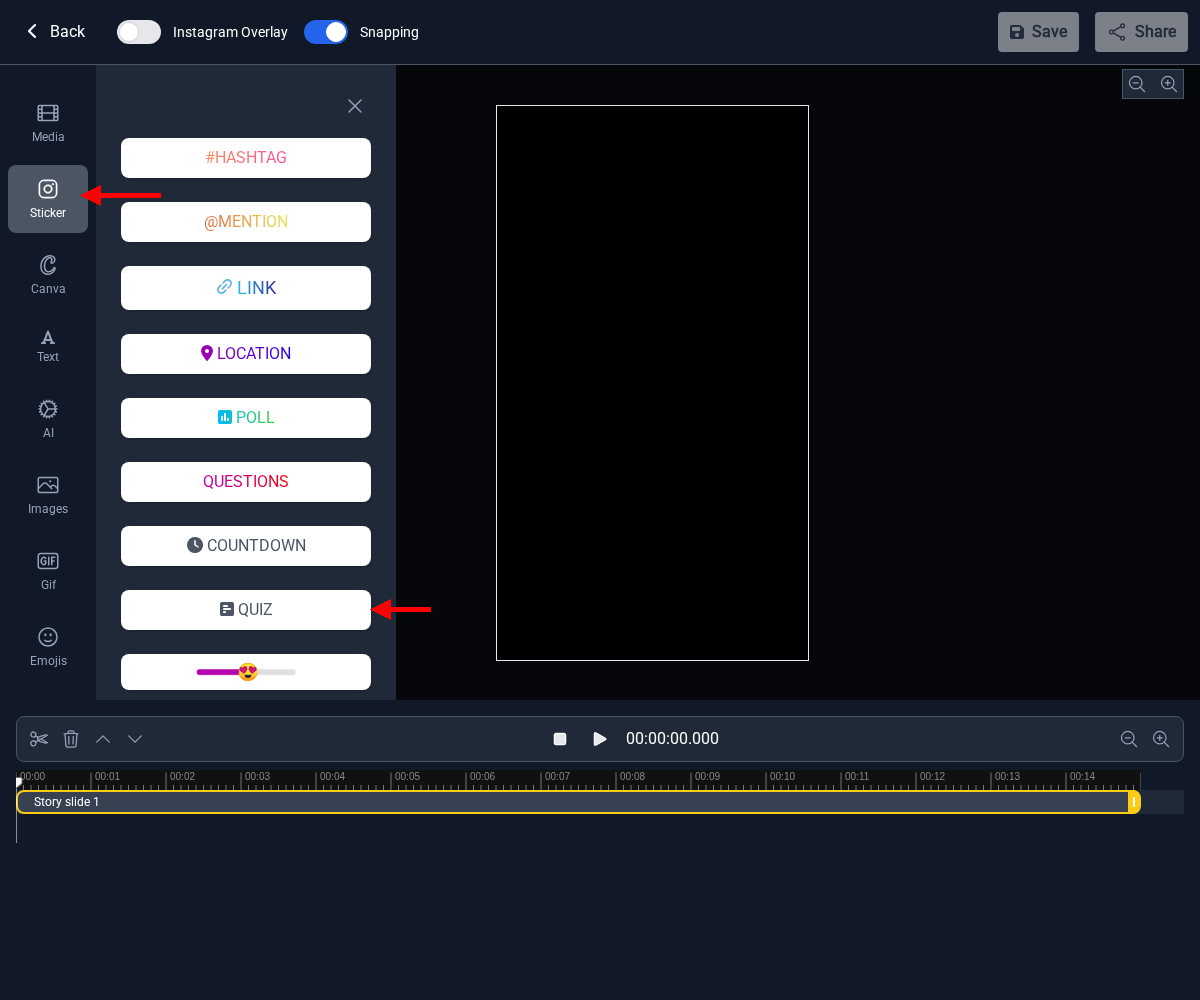
Step 2: Click the “QUIZ” button. A dialog will appear where you can set up your quiz.
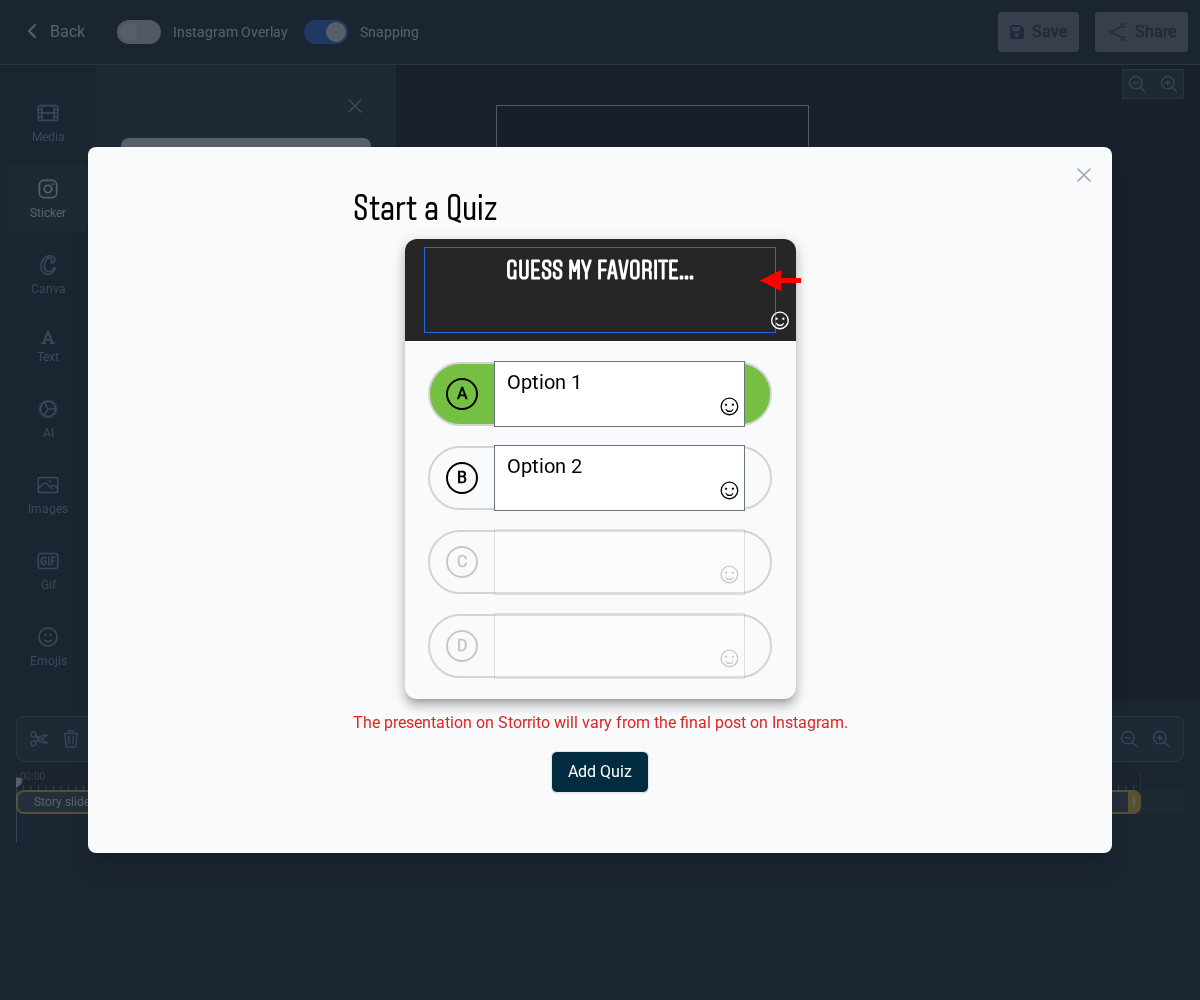
Step 3: Fill in the quiz details:
- Question: Enter the quiz question.
- Answers: Provide up to four answer options. The correct answer (A) is highlighted in green.
- Click “Add Quiz” when you're done.

Step 4: The Quiz sticker is now part of your story. You can drag it to reposition it on the canvas.

What to do if the quiz sticker isn't clickable
As of April 2026, some users have reported that the quiz sticker is missing from their Instagram Stories or doesn't appear as interactive once posted. This is typically a regional or account-side issue rather than a Storrito issue — Storrito adds the sticker as requested, but Instagram controls whether it displays as interactive.
Regional availability
Per Instagram's own documentation, the quiz sticker may be unavailable in Japan and some European countries. This is tied to regional privacy regulations like the ePrivacy Directive — Meta has previously disabled interactive stickers and polling features in Europe to comply with EU data protection rules. For affected users, the restriction may be indefinite, as Instagram hasn't made an official public statement explaining the removal.
Sticker missing even in supported regions
There are also widespread reports of the quiz sticker disappearing from Instagram Stories entirely, even in regions where it should be available. Polls usually remain available, and the quiz sticker can often still be added when creating a Reel.
Known workaround: add a quiz sticker to a Reel draft (no need to post it). The sticker then reappears under “recently used” in Stories.
Basic troubleshooting
If the workaround above doesn't help:
- Update the Instagram app to the latest version via the App Store or Google Play
- Log out and back in, or uninstall and reinstall the Instagram app
- Keep in mind that not all stickers are available in all regions or for all content types
To learn more about how the quiz sticker can help improve interaction with your followers, check out our in-depth article here.
Tools
- Subtitle overlay
- Auto Post Instagram Stories
- How to Upload a Video to Instagram Story from PC
- Schedule Instagram Stories with the Link Sticker
- Instagram bio generator
- Upload and post Instagram Reels from PC
- Subtitle generator
- Instagram grid maker
- Schedule Instagram Stories
- Turn an MP3 into an Instagram Story video
- Can you schedule Instagram stories? Yes, with Storrito.com! (Here's How)
- Instagram Story bingo generator
- Storrito toolbox
- Instagram Story Planner (Scheduler)
- Instagram font generator
- Instagram Story 'this or that' generator
- Schedule Facebook Stories from PC
- Instagram Story Maker Online
- Trim a video
- Instagram carousel maker
- PDF to Instagram carousel
- How to schedule Instagram Reels
- How to add a story in Instagram from PC or Mac?
- Post Instagram Stories from PC
- Instagram Story tier list generator