How To Set Up Facebook Crossposting For Instagram Stories
Storrito shares your Instagram Stories to Facebook using Instagram's own crossposting. The Story is posted to Instagram, and Instagram mirrors it to the Facebook Page linked to your Instagram account. That means the link between the two accounts has to be set up on Instagram's side first — Storrito can't create it for you.
There are three parts to it: link the accounts on Instagram, sync the account in Storrito so it picks up the link, then tick the crossposting box each time you schedule a Story.
Part 1: Link your Facebook Page and Instagram account
To connect your Instagram account to your Facebook Page, you need a professional Instagram account and admin rights on the Facebook Page. If your Facebook Page belongs to a Meta Business Account in Business Manager, add the Instagram account to the same Meta Business Account before connecting them.
If you don't have a professional Instagram account, you can switch your personal account to a professional one.
You'll also need Facebook access to the Page, which is what lets you manage linked accounts.
- Log in to Facebook and click your profile photo at the top right
- Click See all profiles and choose the Facebook Page you want to manage
- Click your Page's profile picture at the top right
- Select Settings & privacy, then choose Settings
- Under Permissions, click Linked accounts
- Next to Instagram, click View
- Click Connect account and follow the steps to link the accounts
If your Instagram account is linked to more than one Facebook Page
Choose which one your Stories go to from the Instagram app:
- Open the Instagram app on your phone
- Tap your profile picture at the bottom right
- Tap the menu icon
- Go to Settings
- Tap Account
- Tap Linked Accounts
- Tap Facebook
- Select Share to your profile or page
- Choose the Facebook Page you want your Stories crossposted to
Part 2: Sync the account in Storrito
Storrito reads the Facebook link from Instagram when you sync. Until you do this, Storrito doesn't know the link exists.
- Open Instagram Accounts in the left menu
- Click your account to open its details
- Click Sync, next to the account name at the top of the window
When the sync finishes, the FACEBOOK section of the account window shows the linked destination's name with its type in brackets, for example Soul.globe (PAGE). That's your confirmation that Storrito has the link.
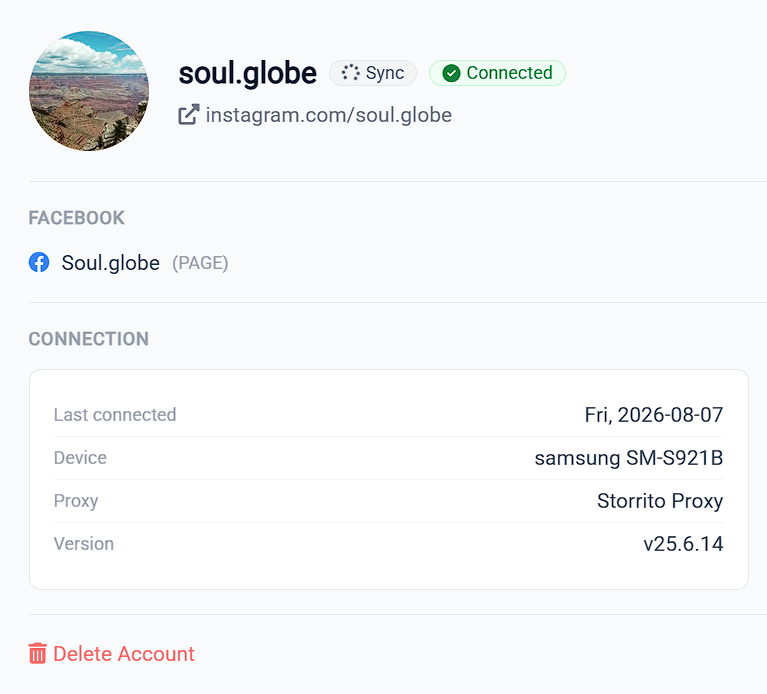
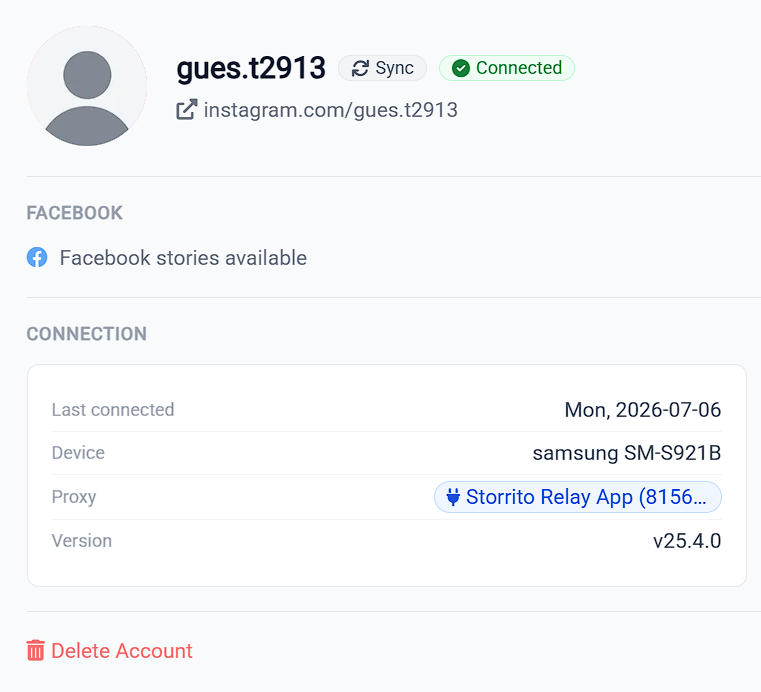
If the section only says Facebook stories available, Storrito has no Facebook destination on file for that account. The wording sounds like a confirmation, but it's the opposite. Two different situations produce it, and they need different fixes:
- The link was never set up. Go back to Part 1 and connect the accounts on Instagram's side, then sync again.
- The link exists, but Storrito hasn't picked it up. Sync again and give it a moment to finish. If it still doesn't appear, open Instagram and check which Page is selected for sharing, then sync once more.
Part 3: Tick Share to Facebook when you schedule
Crossposting is a per-Story choice in Storrito, not a global setting. There's nothing to switch on once and forget about — you decide each time you schedule.
- Schedule a Story as usual. See How To Schedule Instagram Stories And Reels
- In the Instagram Story options card, under your @username, you'll find a Share to Facebook: row with a checkbox for the linked Facebook destination
- Tick it, then set your date and time and schedule as normal
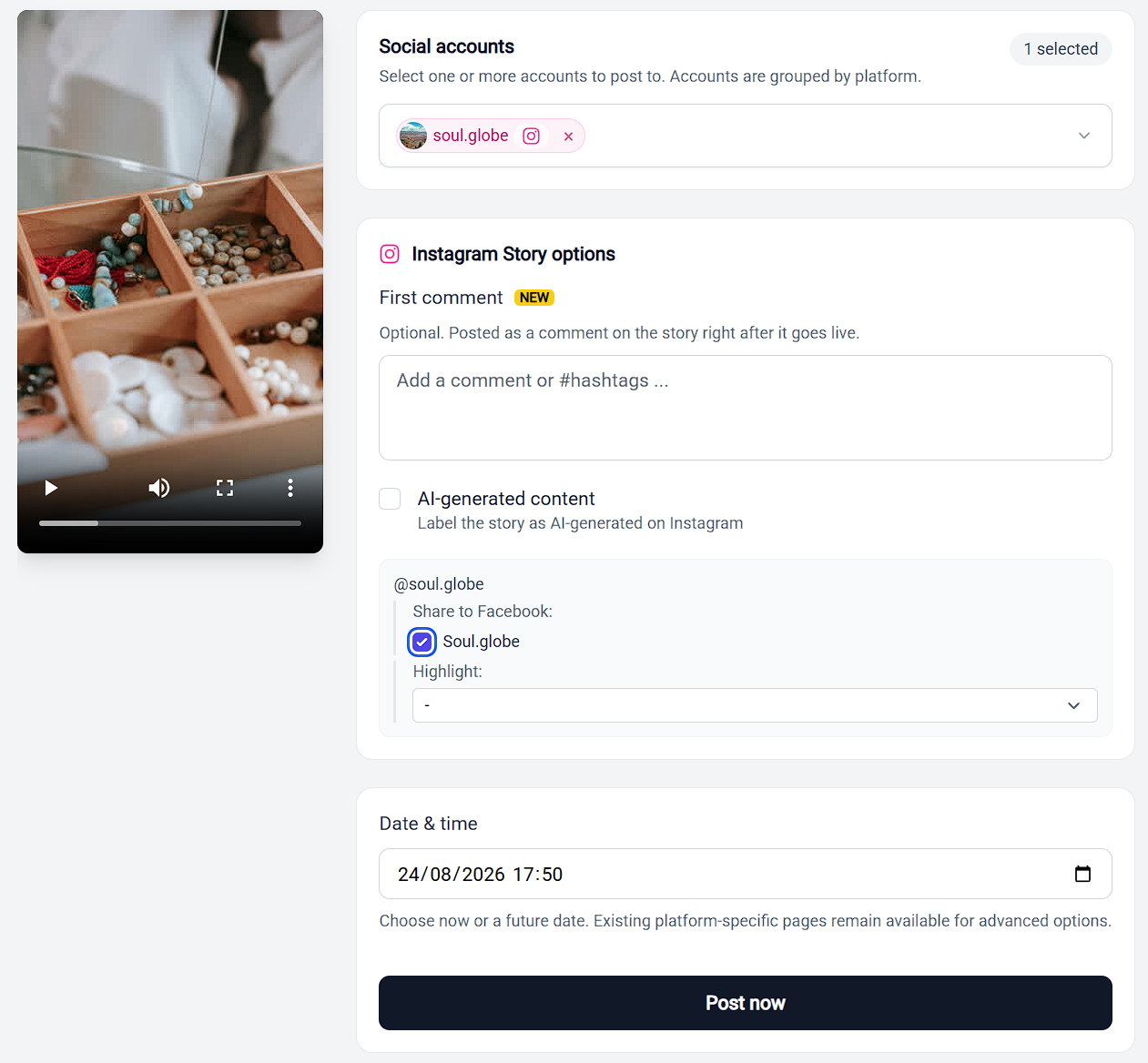
Storrito remembers your choice, so the box is usually already ticked the next time.
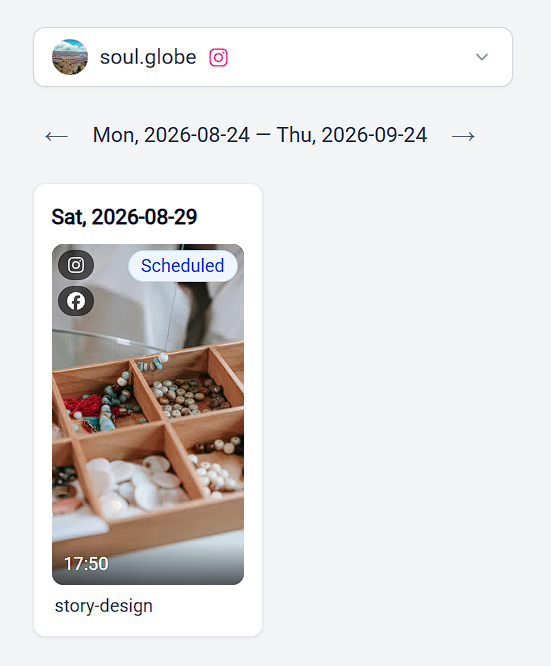
On the Schedule page you can tell at a glance which Stories are crossposting. Each card stacks its destination icons in the top left corner of the thumbnail, and a crossposting Story gets a Facebook icon underneath the Instagram one. Hover it and the tooltip reads Cross-post to Facebook. The card also shows its status, such as Scheduled, in the top right.
If the Share to Facebook row isn't there
The row doesn't render at all when Storrito has no Facebook link on file for that account, and the scheduling page doesn't explain why. Work through Part 2 above: sync, check what the FACEBOOK section says, and reopen the scheduling page.
If syncing doesn't bring the Page in, see Facebook Crossposting Troubleshooting.
Can I crosspost to my Facebook profile instead of a Page?
Only with a personal Instagram account. Storrito picks up one Facebook destination per Instagram account, the one Instagram reports as active for crossposting, and which one that is depends on your Instagram account type:
- Business or Creator account: the destination is always a Facebook Page. Adding your Facebook profile under Sharing across profiles and switching on sharing to it doesn't change what Storrito sees, so the FACEBOOK section keeps showing the Page.
- Personal account: the destination is your Facebook profile, shown with (USER) in brackets.
If you run a Business or Creator account and want a Story on your profile as well, share it from the Instagram app. Crossposting to a profile from a Business or Creator account is on our feature request list.
Two things worth knowing
This applies to Stories only. The Recommend on Facebook checkbox in the Instagram Reel options card is a different feature. It lets Instagram recommend your Reel to people on Facebook; it does not post the Reel to your Page.
Only question stickers stay interactive on Facebook. Link, poll, music, and quiz stickers appear as static images once the Story is mirrored across. See How To Share Your Stories On Facebook.
Turning crossposting off
To stop crossposting for a single Story, untick Share to Facebook on the scheduling page.
To unlink the accounts entirely:
- Log in to Facebook and click your profile photo at the top right
- Click See all profiles and choose the Facebook Page you want to manage
- Click your Page's profile picture at the top right
- Select Settings & privacy, then choose Settings
- Under Permissions, click Linked accounts
- Next to Instagram, click View
- Click Disconnect account and confirm by clicking Yes, disconnect
Tools
- Subtitle overlay
- Auto Post Instagram Stories
- How to Upload a Video to Instagram Story from PC
- Schedule Instagram Stories with the Link Sticker
- Instagram bio generator
- Upload and post Instagram Reels from PC
- Subtitle generator
- Instagram grid maker
- Schedule Instagram Stories
- Turn an MP3 into an Instagram Story video
- Can you schedule Instagram stories? Yes, with Storrito.com! (Here's How)
- Instagram Story bingo generator
- Storrito toolbox
- Instagram Story Planner (Scheduler)
- Instagram font generator
- Instagram Story 'this or that' generator
- Schedule Facebook Stories from PC
- Instagram Story Maker Online
- Trim a video
- Instagram carousel maker
- PDF to Instagram carousel
- How to schedule Instagram Reels
- How to add a story in Instagram from PC or Mac?
- Post Instagram Stories from PC
- Instagram Story tier list generator