How To Add The Slider Sticker
Adding interactive elements like Slider stickers to your Instagram Stories can help you gauge audience sentiment and gather quick feedback. Here's how to add one using Storrito.
Steps to Add a Slider Sticker in Storrito
Step 1: In the editor, click “Sticker” in the left sidebar to open the sticker panel.

Step 2: Click the “SLIDER” button. A dialog will appear where you can configure the slider.

Step 3: Fill in the slider details:
- Question: Enter a question or prompt.
- Emoji: Choose a slider emoji from the picker.
- Color: Pick a sticker color to match your story.
- Click “Add Slider” when you're done.
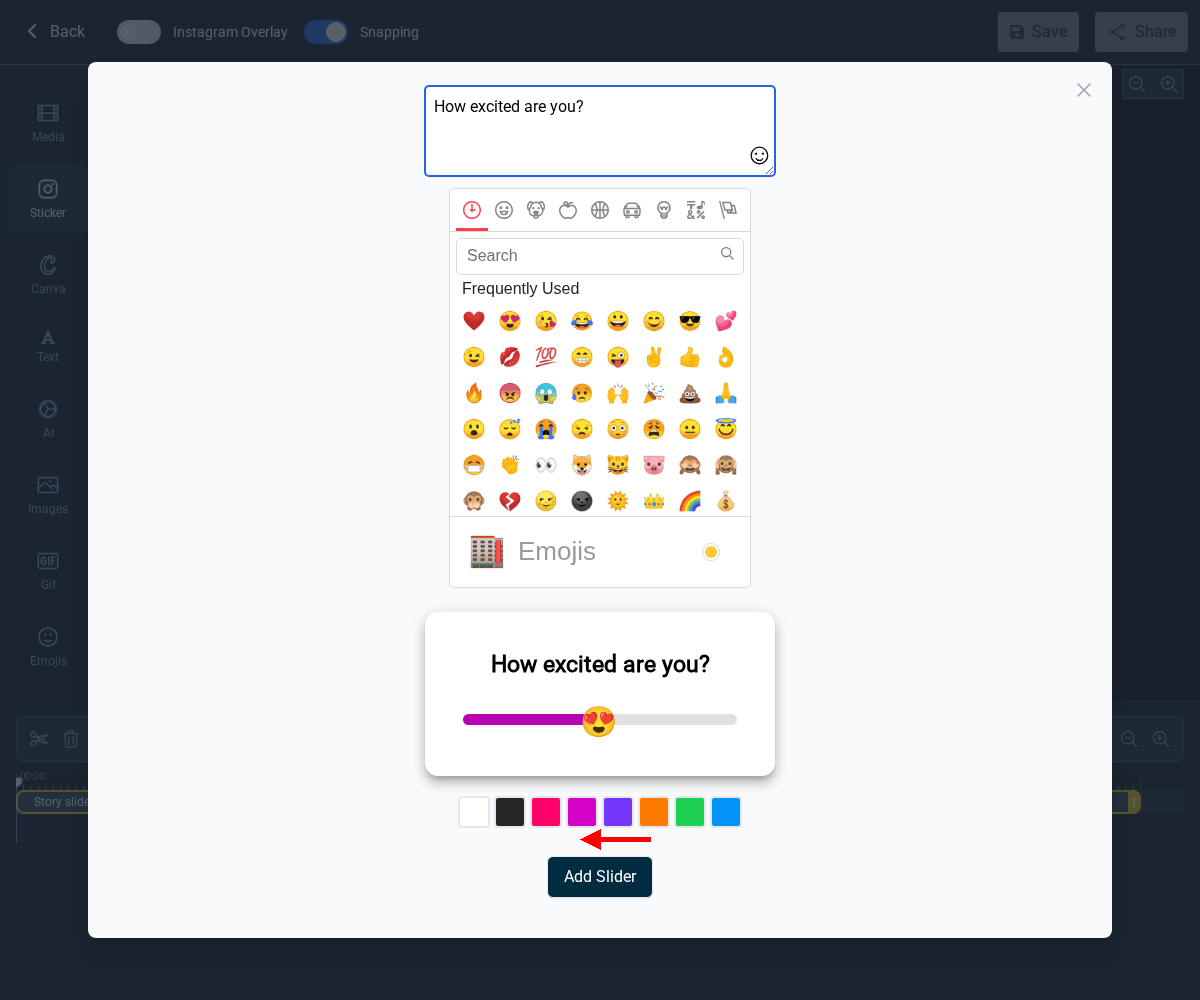
Step 4: The Slider sticker is now part of your story. You can drag it to reposition it on the canvas.

If you're interested in learning more about how interactive stickers can benefit your business, check out our in-depth article here.
Tools
- Subtitle overlay
- Auto Post Instagram Stories
- How to Upload a Video to Instagram Story from PC
- Schedule Instagram Stories with the Link Sticker
- Instagram bio generator
- Upload and post Instagram Reels from PC
- Subtitle generator
- Instagram grid maker
- Schedule Instagram Stories
- Turn an MP3 into an Instagram Story video
- Can you schedule Instagram stories? Yes, with Storrito.com! (Here's How)
- Instagram Story bingo generator
- Storrito toolbox
- Instagram Story Planner (Scheduler)
- Instagram font generator
- Instagram Story 'this or that' generator
- Schedule Facebook Stories from PC
- Instagram Story Maker Online
- Trim a video
- Instagram carousel maker
- PDF to Instagram carousel
- How to schedule Instagram Reels
- How to add a story in Instagram from PC or Mac?
- Post Instagram Stories from PC
- Instagram Story tier list generator